
For hams who spend operating time switching between spotting pages and radio controls, POTACAT brings several everyday tasks onto one screen.
Finding an activator is only part of the hunt. Next comes tuning the radio, checking the mode and getting ready to log the contact. POTACAT brings spotting and radio control together, with the potential to make that routine more convenient.
Spotting Sources in One Place
According to the official POTACAT website, the application now advertises eleven live spotting sources, including POTA, SOTA, WWFF, GMA, DX Cluster, Reverse Beacon Network and PSKReporter. Operators can filter spots by band, mode and distance.
For someone who hunts parks, chases summits and watches for DX, that combined view could mean less time switching windows and more time listening.
New to park hunting? My introduction to Parks on the Air offers background on the activity and the roles of hunters and activators.
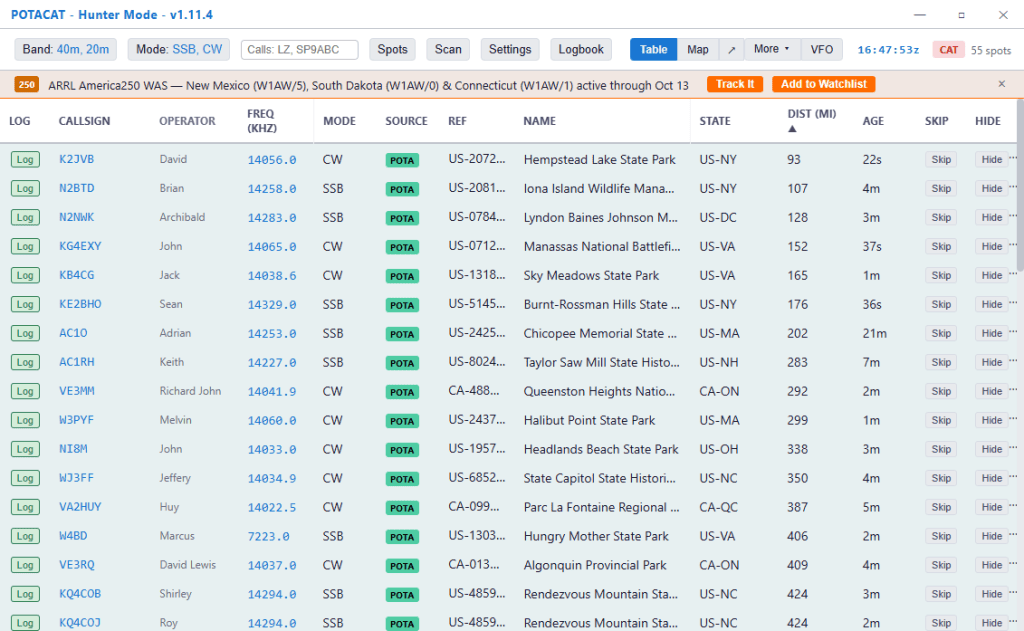
Click a Spot and Tune the Radio
POTACAT offers click-to-tune operation with a connected, configured radio. The project advertises compatibility with more than 300 radios, using Hamlib alongside native FlexRadio and direct serial connections. Supported brands include Icom, Yaesu, Kenwood, Elecraft and QRP Labs. Radio-control details
The practical appeal is straightforward: find an interesting spot and move the rig to that frequency without entering it manually. A spot still doesn’t guarantee you’ll hear the station, but it can shorten the steps between finding a callsign and checking the signal.
For the logging side of a portable outing, see my HAMRS overview. It describes my field-logging workflow and ADIF exports—a useful companion topic when thinking through how contacts move from the radio into a log.
Desktop and Raspberry Pi Options
Downloads cover Windows, macOS and Linux, including ARM64 builds identified for Raspberry Pi 4 and 5 systems. That makes the software interesting for operators considering a compact station computer. Download options
That small-computer approach also connects with my earlier W3DJS Ham Pi Project Review, which covers Raspberry Pi experiments and an off-grid FT8 setup. Treat it as project background rather than a current POTACAT installation guide.
What’s Free—and What Costs Extra?
The desktop application is free and open source, with no required subscription. Remote access also has a free browser client. The optional ECHOCAT mobile app is listed at $9.99, while the optional POTACAT Cloud service is $5 per month. Current features and pricing
Those distinctions matter when planning a remote setup: the free desktop program and the optional paid services are separate choices.
For POTA hunters and operators who follow several spotting networks, POTACAT offers an appealing approach to consolidating the operating desk. This is a feature overview, rather than a hands-on review; compatibility and day-to-day performance with a particular station still need evaluation.
Details checked October 23, 2026. The official site listed desktop version v1.13.1. Recheck the release and optional-service pricing before publication.
Follow Me on Mastodon
Discover more from KE2YK
Subscribe to get the latest posts sent to your email.

